
Profit and Loss, with comparison
Current period against the prior period and the same period last year, so a change is legible as a change. Expense grouping follows your operations rather than the default chart.

A Profit and Loss with sixty undifferentiated expense lines is a document, not information. Reporting is the part of bookkeeping where the numbers get arranged around the questions you are actually trying to answer.
Profit read by job, property, or entity Period comparisons, not single snapshots A short written note on what changed
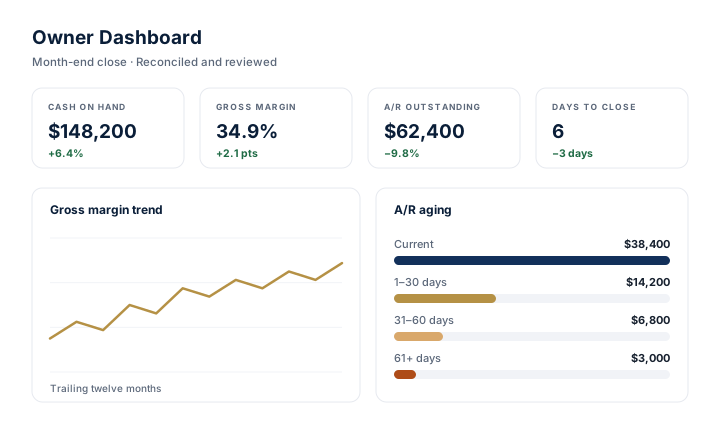
They are short of reports that answer a question. QuickBooks Online will produce dozens on demand, and that is part of the difficulty.
The default Profit and Loss shows the company as one undifferentiated whole. If you run four jobs, or eleven properties, or three entities, a single company total tells you whether the month was good without telling you which part of it was good, which is the only version that changes what you do next.
A single-period report has the same problem. Revenue of a certain size means nothing without last month, the same month last year, or the budget beside it. Without comparison you cannot distinguish a trend from an anomaly, and you end up reacting to noise.
Then there is the balance sheet, which most owners skip. It is where the uncomfortable information lives: receivables that have stopped moving, loan balances that do not match the amortization schedule, liability accounts that have been accumulating small errors for a year.
Reporting is not about producing more documents. It is about deciding, in advance, which numbers you need to see every month, arranging the books so those numbers are actually derivable, and then delivering them the same way each time so you learn to read them at a glance.
Reporting is designed around the decisions you make, not around the reports the software happens to offer. That means the chart of accounts and the job, class, or property structure come first.
A short conversation about the decisions you actually make: pricing, hiring, whether a property is carrying itself, whether cash covers the next two months. That determines the report set, not a template.
Costs are coded to jobs, properties, classes, or entities from the start. No amount of report formatting can separate a cost that was never coded, so the structure has to precede the reporting.
Profit and Loss, balance sheet, and cash view, with period comparisons rather than a single column, arriving on an agreed date each month so it becomes a routine rather than a request.
Profit by job, by property, or by entity, depending on your business. This is where the reporting stops being generic and starts being specific to how you make money.
A short plain-language note with the package: what moved, what looks unusual, and what needs your attention. Numbers without interpretation still leave the reading work with you.
Reporting describes what has already happened. Where a forward-looking view such as a rolling cash outlook is useful, it is built from your own assumptions and clearly presented as a projection, not as assurance about a future result.
The core set is the same for every client. The segment views on top of it are not.
Current period against the prior period and the same period last year, so a change is legible as a change. Expense grouping follows your operations rather than the default chart.
Reconciled cash, receivables and payables aging, loan balances tied to their schedules, and the liability accounts that quietly drift. The uncomfortable page, read on purpose.
Where cash went and what is committed. For businesses where timing is the constraint, a rolling near-term outlook built from your own assumptions and labeled as a projection.
Profit by job, by property, or by entity. This is the report most owners were missing, and the reason the coding work earlier in the cycle matters.
Plain language, no jargon. What moved, what looks unusual, what needs a decision from you. Usually shorter than one page.
Reconciled statements and supporting detail in a form your tax professional can work from directly, without a round of questions in March.
A worked example of a segment report, using fictional figures, is available on See How We Work.
Every engagement is scoped in writing before it starts, so the boundary is agreed rather than assumed.
Meridian Ledger Group LLC provides bookkeeping, payroll support, and financial reporting. It does not provide tax, legal, audit, or investment advice, and does not prepare or file tax returns. Meridian is not a CPA firm and does not perform audit, review, or attestation engagements.
Every business gets the same core statements. What differs is the one segment view that turns those statements into something you can act on.
Gross margin by job, with direct costs separated from overhead. Work in progress, progress billing, and retainage read against the contract rather than the invoice.
Construction bookkeepingProfitability per property and per entity, with financing cost visible, so you can tell which building is carrying itself and which one is being carried.
Real estate bookkeepingOwner-level reporting that ties to the ledger, portfolio-level views for your own business, and the two kept properly distinct.
Property management bookkeepingReporting depends on the coding underneath it. It is delivered as part of monthly bookkeeping, and if the file is behind, cleanup and catch-up comes first.
Thirty minutes, by video, at no cost. Bring a recent Profit and Loss, or nothing at all, and Meridian will show you what it would take to read profit by job, property, or entity.
Mon to Fri, 9:00 AM to 5:00 PM Pacific Lake Stevens, WA. Working virtually nationwide.
The statements come from QuickBooks Online either way. The difference is that the chart of accounts and the job, class, or property structure are arranged so the segment reports are derivable at all, the comparison periods are set, and the same package arrives on the same date with a written summary.
Meridian can prepare the statements and supporting detail they are asking for. It cannot audit, review, compile, or certify them, since that is CPA attestation work. If a lender specifically requires reviewed or audited statements, you will need a CPA firm, and Meridian will provide the records they need.
A rolling near-term cash outlook is often the most useful forward-looking view, and it can be built from your own assumptions. It is clearly labeled as a projection based on those assumptions rather than presented as a prediction of what will happen.
It depends on the business, which is why the first conversation is about your decisions rather than a template. For contractors it is usually gross margin by job and near-term cash. For property owners it is net operating result per property and debt service coverage. For property managers it is the accuracy of owner reporting and the state of receivables.
Yes, though weekly reporting is only meaningful if the underlying data is current, which usually means bank feeds are reconciled continuously rather than at month end. That is worth discussing rather than assuming, because more frequent reports on stale data reduce trust rather than build it.
They come as a consistent statement package, plus saved report layouts inside your own QuickBooks Online file that you can run yourself at any time. Meridian does not add a separate third-party dashboard tool, because one more login is rarely what makes numbers easier to trust.
The close cycle that has to happen before any report can be relied on.
Monthly bookkeepingA worked job-margin example with fictional figures, and the close checklist.
See how we workThirty minutes on what your current reports can and cannot tell you.
Book a reviewReach a real person. No chatbot, no queue.
Monday–Friday, 9:00 AM – 5:00 PM Pacific.